Well, my third post today, told you I'd be back, and well now I am. With much better tools for the job.
I currently have:
*Galaxy s3 Tmobile unlocked
*Acer a100 tablet
*Huawei Ideos, the original one on tmobile no sim.
*Hp Pavilion dm4 variant.
*asus EEEpc 2009 variant
*Broken Motorala fire (Lol softbricked)
What this means is that I will be posting more reviews, more stories and more everything.
Sunday, November 18, 2012

Lg optimus one hacking
Many people reading this blog may never have heard of the lg optimus one series. Heck, many of you don't even care about it, but i do, as it has been my phone for approx. 2 years now, and it has served me well. I own the t-mobile variant of the optimus, known as the optimus t, and it comes with the old baseband version of .25 and a stock rom of android 2.2 with customizations by both t-mobile and lg. I used this stock rom for a while until proceeding to cyanogenmod 7 with baseband fix, then Cm 9, then a bunch of cm7 based roms until finally settling down onto cm10. I will be posting rom reviews and other things for this phone but sadly will not be able to review new ones as I have purchased a galaxy s3 and have passed down my optimus t. I will however be posting reviews of the Huawei Ideos roms as I have recieved one as a gift, anyway back on topic. The Lg o1 is a great phone and I was sad to see it go, but with its weak processor and touch lag issues I thought it really was time for an upgrade, and well the s3 is a perfect upgrade.
Windows 8
So yesterday I jumped the gun and went out and bought Windows 8. After 30 minutes of online research I began to install it on my Pc the Hp pavillion dm4 which has 8gb of ram an intel i5 and beats audio.
I went for the keep all data install option, as I had many files that I could not replace, and that I didn't want to waste my time backing up. Anyway As I have noticed, from other reviews and my own experiences, a clean install of windows 8 should take you around 10 minutes from the beginning of the install to the end, keeping files only should take around 20 minutes and keeping everything took me 30 minutes. As my settings and files transferred I wondered how the new os would play with Hp's add-ons, and it was good news and bad news. I had to uninstall my intel wifi and bluetooth drivers, so if your computer boasts intel wifi, uninstall it before installing windows 8. The good news was that I still have my beats audio software, hp's help center and all other improvements, which are good especially if you aren't a power user. If you are considering upgrading. I must warn you though, if you want to upgrade, do it now because the price will rise from 66.99$ to around 200$. Anyway, time to jump into the review. Windows 8 runs great on both touchscreen and non-touchscreen devices. The Metro apps available from the store run great, as well as the classic windows 7 apps. I saw minimal lag on windows 7 apps though, by which I mean they ran slower than on windows 7. Unnoticable though. Also indie hit "Mineraft" A game that the creator refuses to certify for win8 works perfectly, so if that is your reason to not update, go ahead and update. The Metro and classic interfaces work together but the multitasking features available do not work with classic apps. The Metro ui is obviously made for a touchscreen, but functions fairly well with a mouse. I miss the Start Screen but will probably get used to the new one also, gestures have been bumped up to give Osx a run for its money but Overall I give Windows 8 an 8 because it isn't really as good as it could have been but It's a welcome update over windows 7.
I went for the keep all data install option, as I had many files that I could not replace, and that I didn't want to waste my time backing up. Anyway As I have noticed, from other reviews and my own experiences, a clean install of windows 8 should take you around 10 minutes from the beginning of the install to the end, keeping files only should take around 20 minutes and keeping everything took me 30 minutes. As my settings and files transferred I wondered how the new os would play with Hp's add-ons, and it was good news and bad news. I had to uninstall my intel wifi and bluetooth drivers, so if your computer boasts intel wifi, uninstall it before installing windows 8. The good news was that I still have my beats audio software, hp's help center and all other improvements, which are good especially if you aren't a power user. If you are considering upgrading. I must warn you though, if you want to upgrade, do it now because the price will rise from 66.99$ to around 200$. Anyway, time to jump into the review. Windows 8 runs great on both touchscreen and non-touchscreen devices. The Metro apps available from the store run great, as well as the classic windows 7 apps. I saw minimal lag on windows 7 apps though, by which I mean they ran slower than on windows 7. Unnoticable though. Also indie hit "Mineraft" A game that the creator refuses to certify for win8 works perfectly, so if that is your reason to not update, go ahead and update. The Metro and classic interfaces work together but the multitasking features available do not work with classic apps. The Metro ui is obviously made for a touchscreen, but functions fairly well with a mouse. I miss the Start Screen but will probably get used to the new one also, gestures have been bumped up to give Osx a run for its money but Overall I give Windows 8 an 8 because it isn't really as good as it could have been but It's a welcome update over windows 7.
Saturday, September 15, 2012
THE TECHIE HAS RETURNED
Wow, i literally just realized what a long time its been since This blog has been touched. Its starting to actually gather dust! Well, this may seem like a bad thing, but the reason behind this is that I have been following the newest, awesomest, most cutting edge tech news and am ready to return. So get ready, 'cause here I come
Sunday, June 10, 2012
Minecraft: What is it, and why is it popular
Actually, thats what brught me to it, the modding. Its files are easily manipulated and changed, like I mentioned earlier so even a java and hacking novice such as myself can hack it to some extent. Even though this is true, thats not what this post is about, this post is about why Minecraft is popular and I have a list of 3 of those reasons from my point of view, right here:
1. It's like lego for grown ups: You can build anything, and you can destroy anything. In the world of minecraft, you are god.
2. It has monsters: Well if you aren't into the whole building thing, you have the option of making your own weapons and fighting zombies, spiders skeletons and exploding green things called creepers. Wave after wave of them.
3. You can play socially: Minecraft wasn't originally a social game, but now it is. You can play on servers with your friends, or make new friends on those servers, all without ever signing up for any new social website.
Tuesday, May 22, 2012
Rock Paper Scissors wait.... SHOOT
Rock Paper Scissors:How-to guide to winning
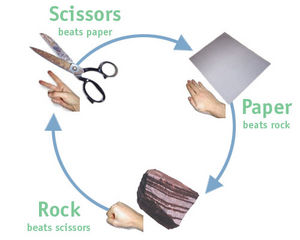
Rock Paper Scissors seems like a simple game doesn't it? In fact, to play, all you really need is a hand, brain and an opponent with a hand and a brain. In fact though, there is a whole slew of strategic things involved in Rock paper Scissors,no joke, and with this guide, chances are you'll be much better at his simple game.
Step 1:Statistically beating anyone
Statistically speaking, rock paper scissors comes from being a mindless game and becomes whole drawers full of data recorded and other complicated recordings. However, all you really need to know (statistically speaking) is that Men usually throw Rock (80% of the time), Women usually throw Paper (75% of the time) and Overall, Rock is usually the most successful throw. With just this information you are much more powerful at rock paper scissors, but that isn't all the information there is. To beat anyone at rock paper scissors, here is some more information to know: Always throw Rock first, it can test your opponents an is successful 60% of the time (as a first shot) If your opponent throws anything but paper, which beats rock throw scissors and then rock. Confusing, isn't it?
Step 2:Body language behind choices
If your opponent smiles chances are he's/she's going to try to use scissors, if he/she hits his/her hand with a lot of force, he/she will probably use Rock and if he/she is very gentle with his/her hand it means he/she is probably going to use paper. This body language is evident in people mostly under 30 and who have not played Rock, Paper Scissors that much. However, when someone is losing, they will try to always throw Rock, even though their body language will change.
Step 3: Extra Tips
Some tips to remember when Playing Rock, Paper Scissors are: always throw rock when losing, it's your best way out usually, analyze who you are playing against and use the statistics in your favor and lastly Don't throw scizzor in the beginning or end of your match. Some good combos are:
Paper, scissors, rock
Friday, May 4, 2012
A review of the Acer Iconia a100
I recently purchased a new tablet. My old Arnova 10 had began to be, how do I put this nicely (not to hurt its feelings) Completely and utterly obsolete. The tablet of my choice was the 329.99$ Acer Iconia a100 7 inch tablet. A very great choice on my half, if I dare say so myself. For the price of around 300$ it offers a Tegra 1 gigahertz processor, 1 gigabyte of ram as well as a fully functioning google apps suite (gmail, play, etc.) My old arnova did not even have a google branded market, much less the all new google play market. It comes with Honeycomb 3.2.1 but can be updated out of the box, to android 4.0 a.k.a. the all new ice cream sandwich
From just reading about it and playing around with it in the store, it seems great, but then again most things look good in the store. This Tablet, though is an exception to the rule and is great of store. a more detailed review after the break:


From just reading about it and playing around with it in the store, it seems great, but then again most things look good in the store. This Tablet, though is an exception to the rule and is great of store. a more detailed review after the break:

After about 1 week of using this tablet it just seems to be getting better and better. It has a gps, runs all apps reasonably smoothly, is great for watching videos and is amazing at web browsing. It has everything you would want in a tablet, and even after the ics update runs smoothly, even though it might suffer compatibility issues after ics with some older apps. In total though this is a great tablet with a great Os.
Subscribe to:
Posts (Atom)